21 SEO tasks you should be automating (and how)

SEO automation used to be reserved for the most technical among us. But, thanks to recent AI advancements, the barrier to entry is lower than ever. Automating SEO workflows is now practical, affordable, and rapidly becoming an industry requirement. And, in fact, the agencies and in-house teams already leveraging these SEO automation tools are saving hours of manual labor every week.
Ultimately, it’s your creativity and mindset that determine the efficiency of your automations. You can have access to the most advanced LLMs and expensive APIs, but if you don’t know how to use them wisely, they can become an expensive waste of time. The tool is only as smart as the logic you give it.
From technical audits and content creation to monitoring and reporting, this guide explores 21 different SEO tasks you and your team should put on autopilot today. Before that, though, we answer a couple of pressing questions about automation methods and how much human involvement you might still need.
Choose your automation methods
You have several choices when automating SEO tasks:
- Traditional automation using tools like Zapier, Make or my favorite, N8N
- AI automation using LLMs like Gemini or Claude
- A blend of both where you combine both traditional automation tools with AI integrations in order to for instance create useful AI SEO workflows
Before you begin to start using AI in all kinds of automations, here’s a brief word of caution. Always try to consider what’s the worst that could happen in every given situation. If it’s something of importance, then the best thing to do would be to have eyes on the process so that if the AI or automation are making mistakes you’ll be able to catch them before any major harm is done.
Can you rely 100% on AI yet for automating your SEO?
You can’t rely 100% on AI automations just yet unfortunately. LLMs like Gemini, ChatGPT or Claude use advanced mathematics in order to predict the next upcoming words in their answers and the processes they utilize to do that means their output can be full of hallucinations.
If you want to use AI in your SEO automations, each step needs to be simple. Too many instructions and the AI can get overwhelmed and have difficulty following directions. To fix your brand’s AI hallucinations try to stick to tasks where you can easily verify the final output.
Whereas automations based on logical rules are predictable, LLMS are much more volatile in their output. Sometimes even rerunning the same exact prompts can actually result in different answers. So for any process where consistency matters, you’re better off with more simple rule-based tools. This is worth taking into consideration if you notice that new models are breaking your SEO workflows.
What SEO tasks can you realistically automate?
With that being said, there are still many ways to speed up your daily work. Here are the top processes you can streamline today.
Site audit and technical SEO automations
A quick and relatively easy thing to try out first is integrating AI into tools you might already be using. Some site crawlers, like Screaming Frog, allow you to integrate with AI using API connections. You can do some cool automations just by following their tutorial here, such as:
- Generating alt text or meta descriptions
- Classifying language or intent of pages
- Running sentiment analysis
- Detecting inappropriate content
- Extracting entities or data
- Creating vector embeddings
But that’s not all. Check out these creative use cases:
DOM vs. HTML checker
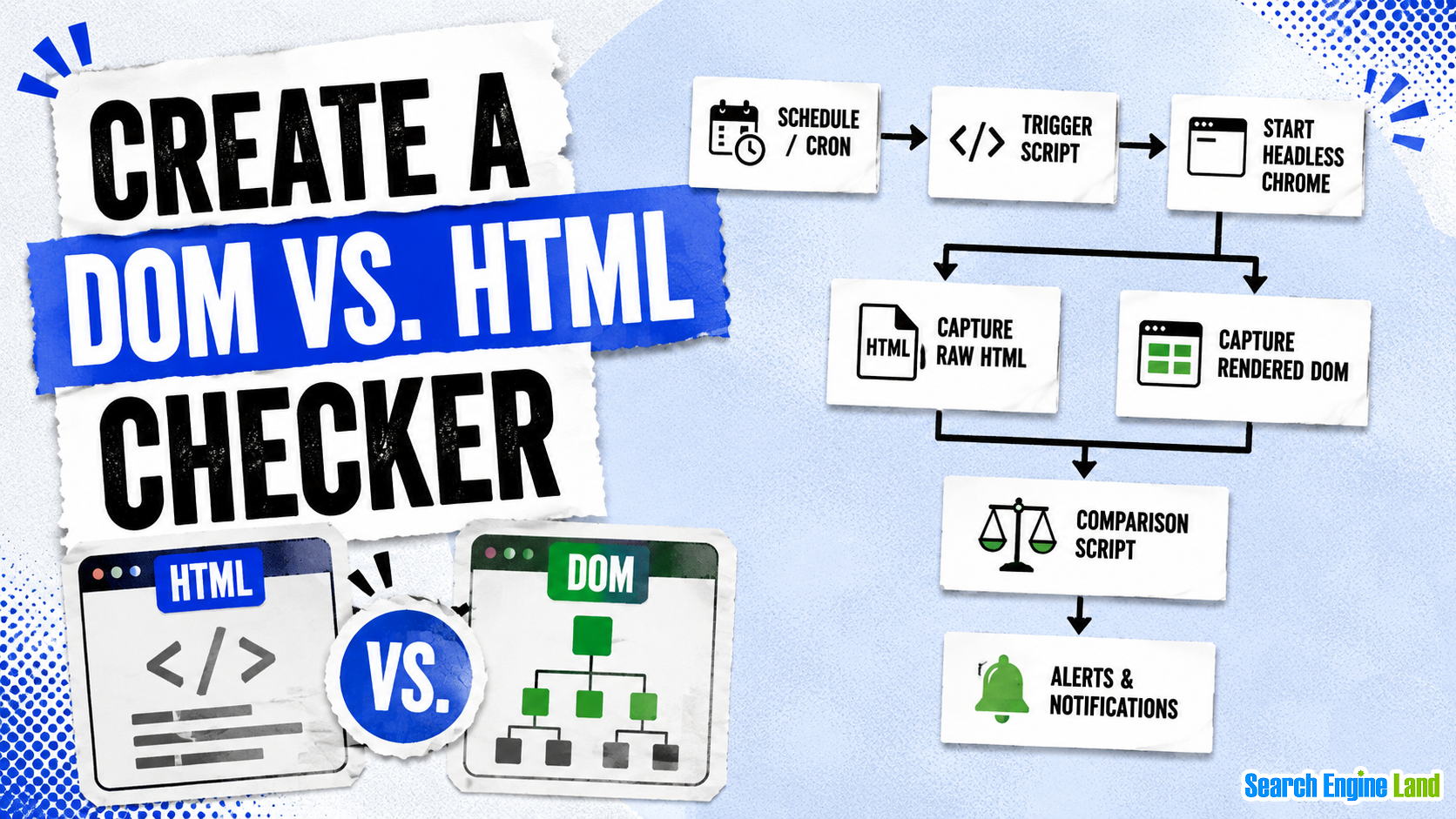
Something a bit more advanced is to create a render checker that will compare your DOM against your raw HTML, making sure to notify you if it finds content that is not being shown to crawlers.
You can set up a headless chrome pipeline that re-renders your key pages on a schedule by automating it with a cron job (a scheduling directive that runs a script at specific times) and a small script. If content becomes invisible to crawlers due to hydration failures, lazy loading issues, or third-party script conflicts, you’ll be the first to know.
The step-by-step looks like this:
- Cron job triggers script
- Start headless Chrome
- Capture both raw HTML and the rendered DOM
- Run the comparison script
- Send an alert of notification in case a difference was detected
Automate crawl budget optimization
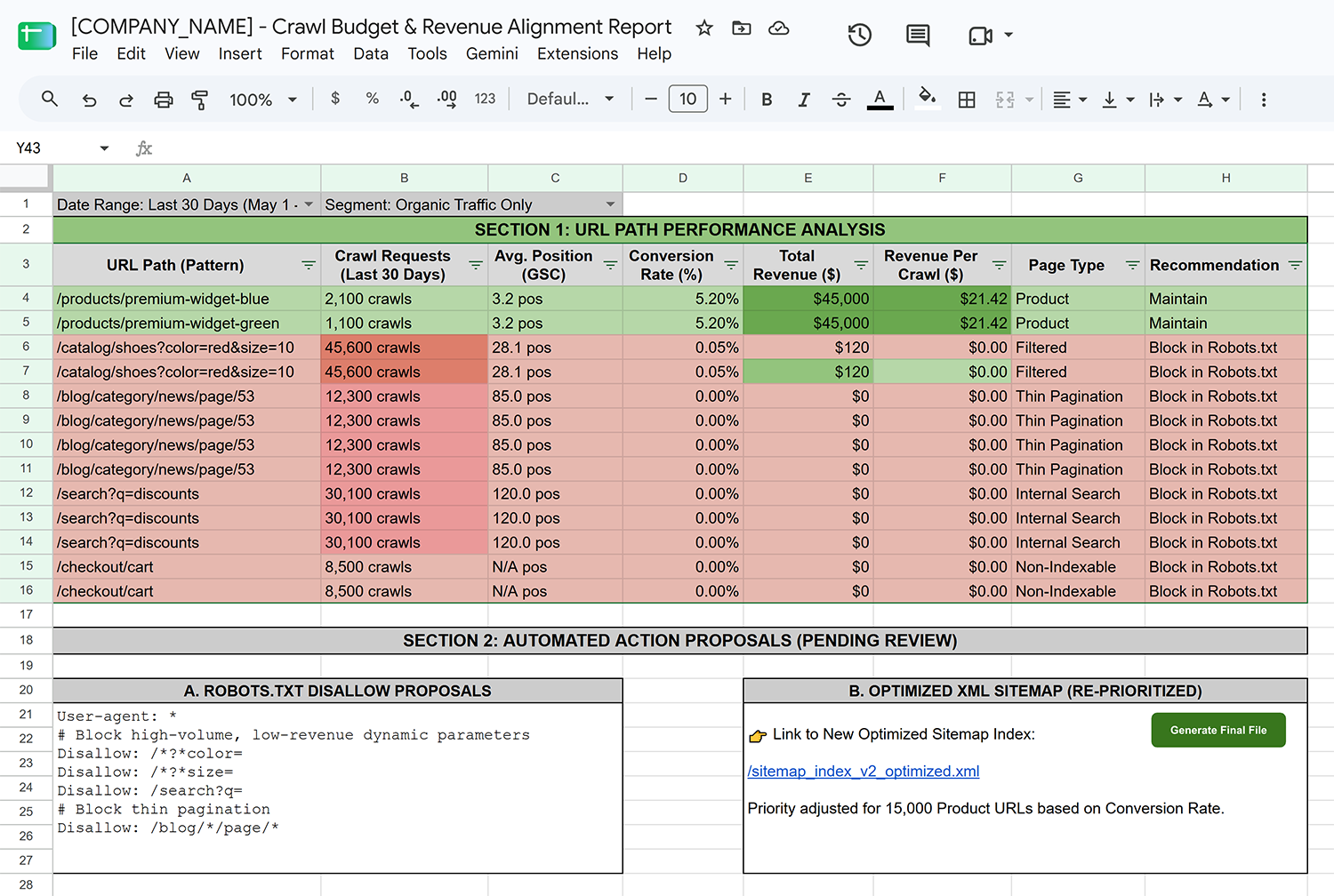
Wasted crawl budget is something we all want to avoid. Large sites are especially prone to this issue where crawlers ping low-value URLs (filtered pages, session parameters, thin pagination, unoptimized landing pages) at the cost of crawling the most important pages.
You can build a system that pulls crawl frequency data from server logs and cross-references it with revenue or conversion data. It can then automatically propose URL paths to disallow in the robots.txt or change XML sitemap priorities.
You would need to start by automating server logs and storing them for your system to be able to access them. Do this using Cloudflare Logpush, for instance, or using a tool like Filebeat.
From there you use Google Big Query to store both the logs and the revenue and/or conversion data and build a python script that will do the analysis as well as output the robots.txt suggestions. Obviously you’d want to manually review this before pushing it, but it can still definitely be a huge time (and crawl budget) saver.
Programmatically check structured data
Many websites miss out on the benefits of structured data because schema generation and implementation remains a tedious, manual process.
To remedy this, you can run an LLM to pass over your content library that will read each page, infer the appropriate schema type, generate valid JSON-LD, validate it against Google’s schema spec, and output a deployment-ready patch. This can be done as a batch pipeline against your CMS API so you can fix this at scale. However you can also just follow Screaming Frog’s tutorial instead and use JavaScript to generate schema.
If you wanted to do it using an LLM to bundle it with other automation processes it would look like this.
- CMS API / Content library pushes the content
- LLM analysis page by page
- LLM detects suitable schema types
- LLM generates the schema data JSON
- LLM or JavaScript validates the code
- If not valid it loops back to the LLM page analysis
- If valid then it’s added to the site

Automating keyword research
One of the more time consuming tasks we have to deal with as SEOs is keyword research. It’s a repetitive process where we expect a similar outcome each time, which is perfect for automation. The Semrush API lends itself perfectly to this exact use case, you can get going very easily following this simple N8N tutorial. However we can go much deeper and automate much more specific and useful processes just by getting a little bit more creative.
Monitor keyword intent
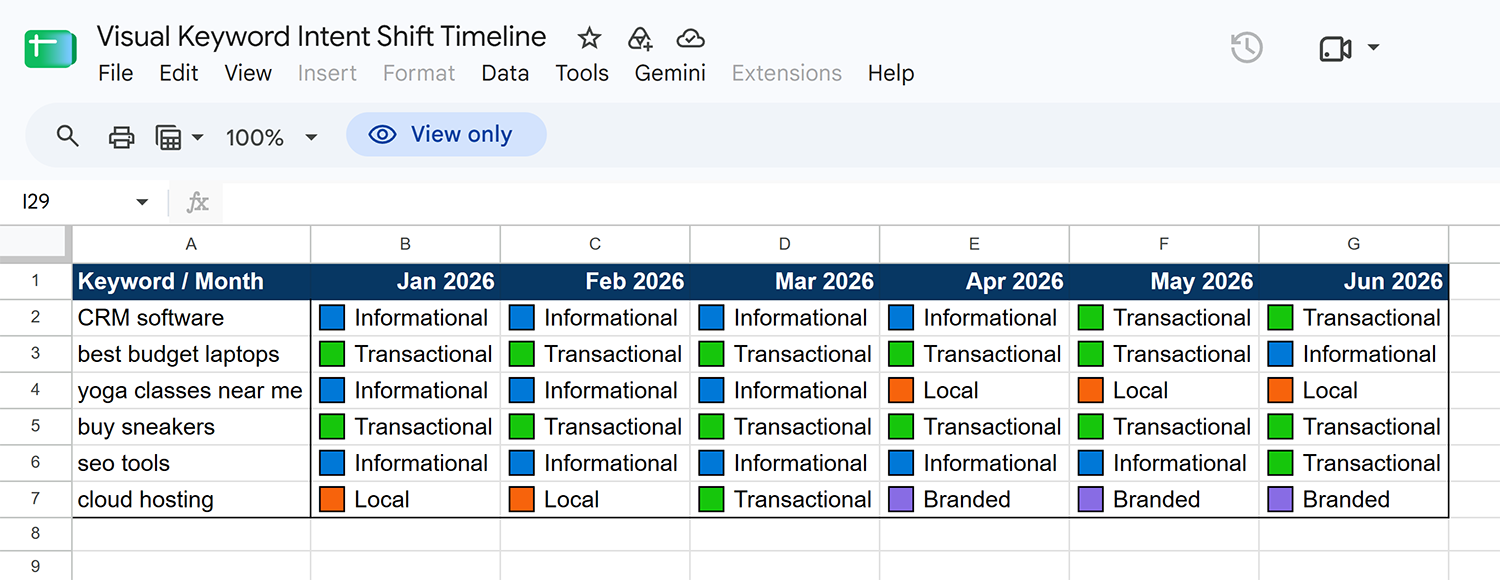
So instead of just tracking rankings, what about monitoring how keyword intent shifts over time? You can classify different intents like transactional, informational, local, etc. and then detect when Google decides to prioritize a different intent than previously for a given keyword.
You can then quickly react if, for example, blog articles are suddenly being swapped for product pages in the search engine results page (SERP). This is the kind of stuff that can really help move the needle and help you to stay on top of the competition.
Here is the breakdown of how you could build this up yourself:
- Get a DataForSEO or SERP API setup
- Use a tool like N8N to leverage an LLM API and build your intent classification system
- Use Google Big Query to store the data
- Write a script that runs on a schedule that compares today’s intent to the past 30 days average
- If it switches to more than 20% then send an alert and/or update a tracking sheet like the one shown below
Automate topical mapping
Here’s another interesting possibility. Understanding how Google defines topical authority can really help you guide your content strategy efforts in the right direction. Automating topical authority maps can be very rewarding if done right.
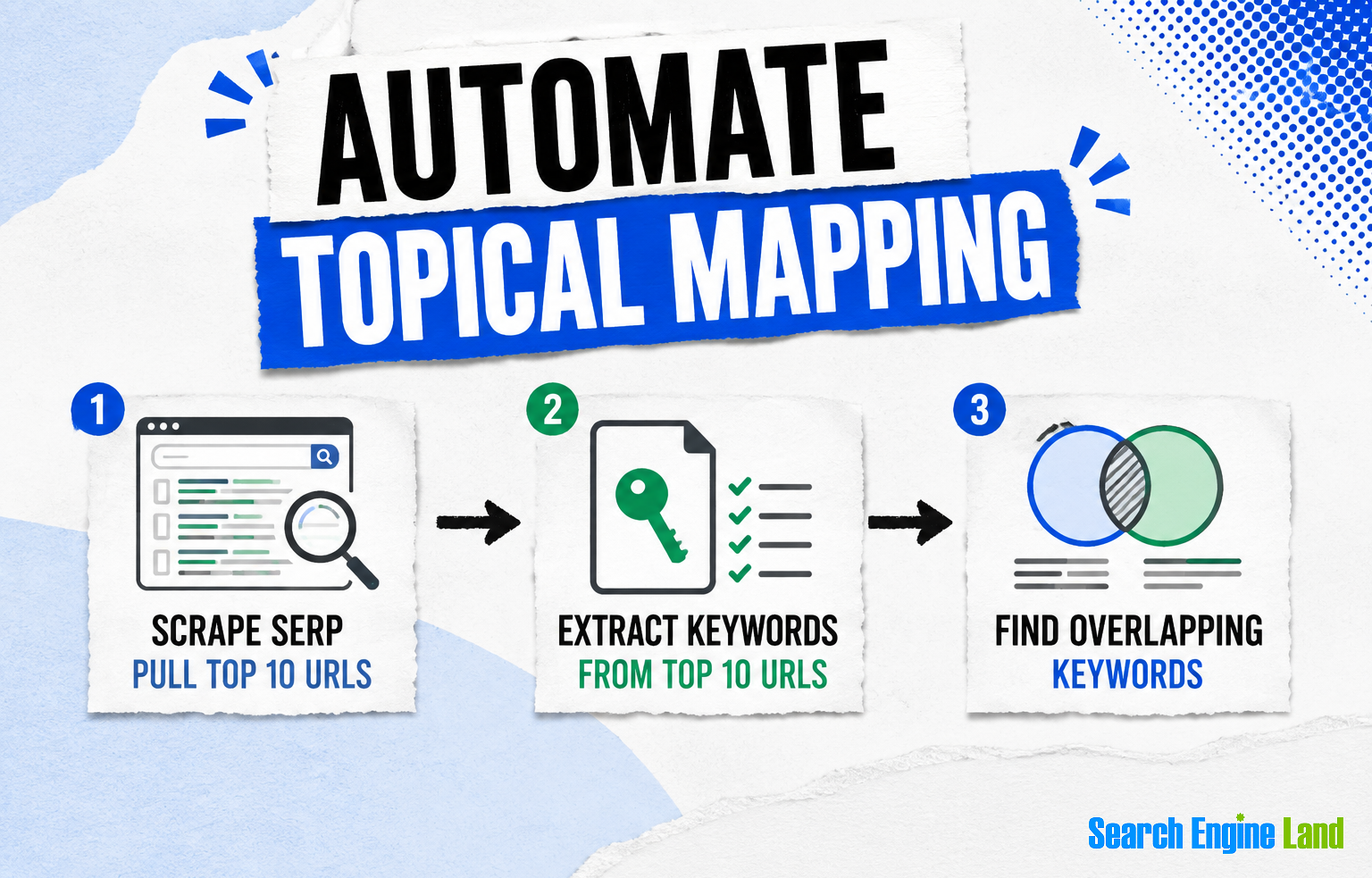
Using a tool like N8N, you can create an automatic workflow that will create these maps for you just by giving it a specific keyword.
- Start with one specific keyword and use DataForSEO or SERP API to pull the top 10 organic ranking URLs.
- Now for each of the URLs pull all the keywords that they individually rank for.
- Then use a simple script to count how many of the sites rank for each keyword.
- Group these by how many sites rank, so for example if a keyword has six or more sites then consider these as core subtopics you should absolutely cover.
- Keywords that have only two to five sites are supporting angles and content gaps that might be worth targeting. The remaining keywords can be ignored or clustered by theme and considered like a third branch of your topical map.
- Use Python to draw this out in a dynamic visual diagram or output it into a Google Sheet.
Track keyword lifecycles
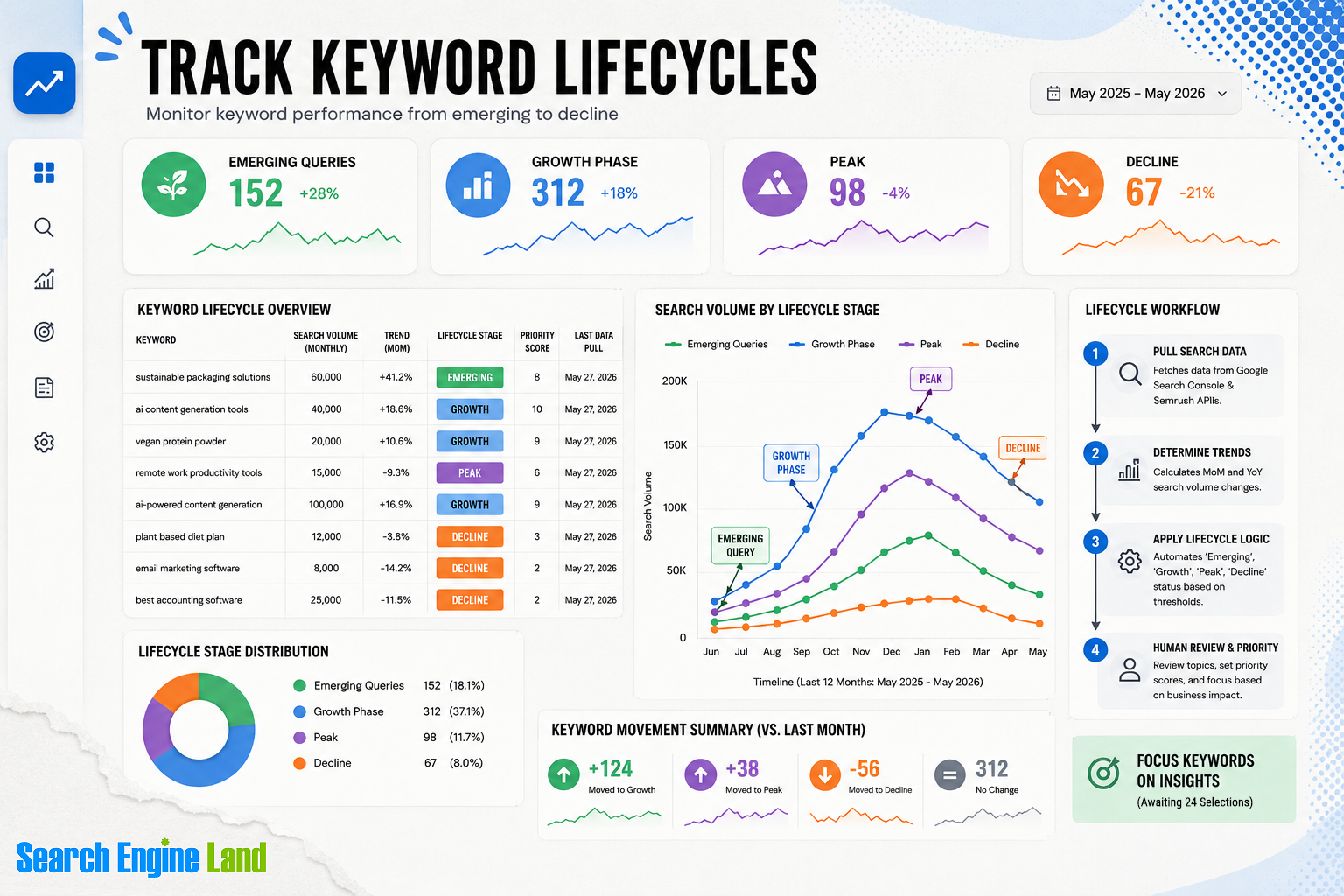
Similarly to our keyword intent monitoring automation we can also make a trend monitoring system to track a keyword’s lifecycle. Using search volume we can determine if a keyword is part of emerging queries, in a growth phase, at its peak, or in decline.
This system is relatively easy to create, you just need historical search volume data and some rules to segment the different phases. You can simply use Google Sheets for this and have a script calculate how much time each keyword spent in a given phase. The key is that your rules must be proportional, not absolute. Because different keywords will have different baselines you can’t just set a rule based on a certain volume. The calculation will need to be proportional to the specific search volume of each keyword.
Analyze query fan-out coverage
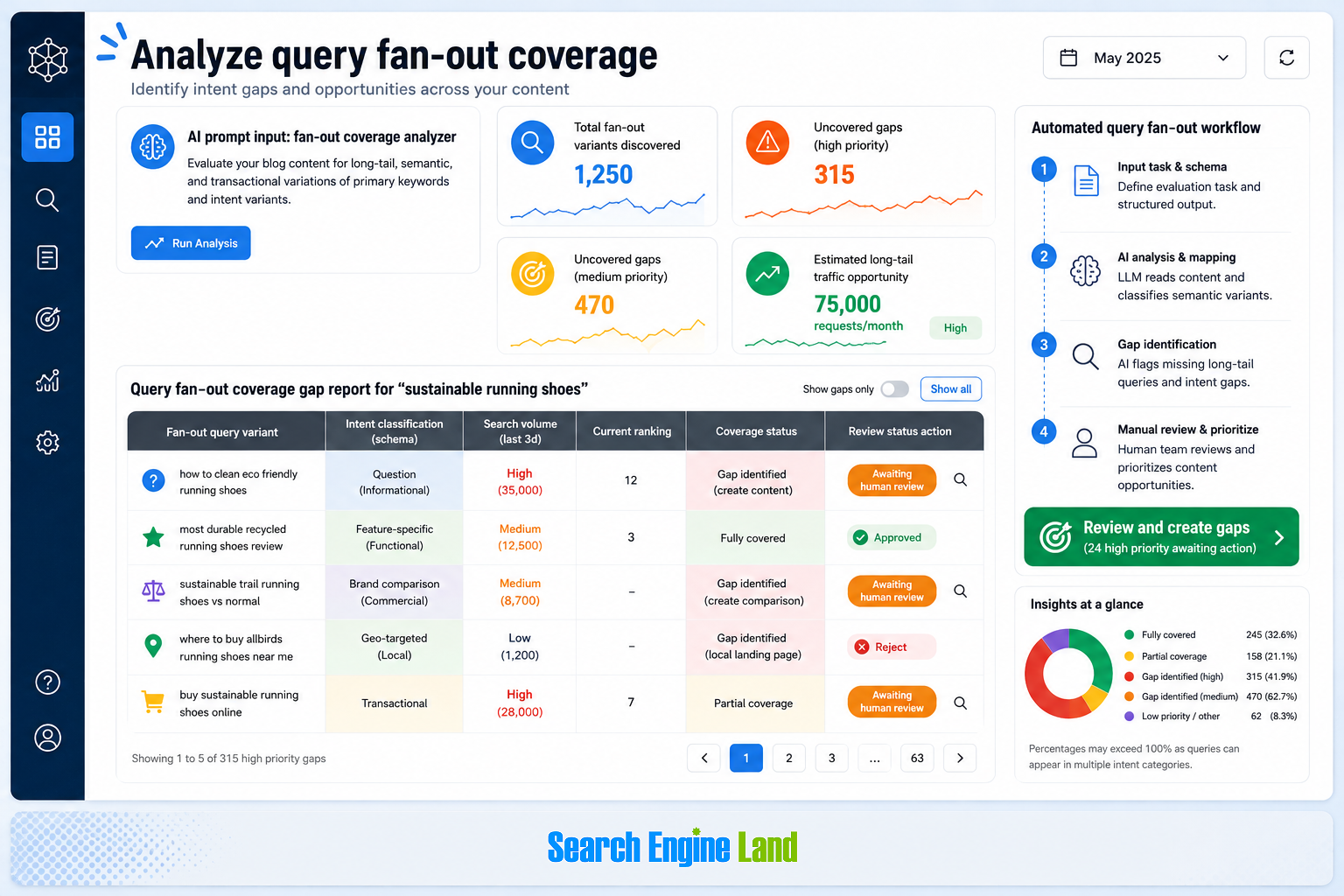
Try putting your content to the test by letting AI evaluate how well it answers different questions based off of your primary keywords. You can also supply the AI with a specific structured schema on how to classify different types of intent variants (informational, functional, commercial, and local).
Although the concept is complex, such a tool is not that difficult to create. You just need a prompting pipeline set up that will take in dynamic data and content to feed into it.
Content automation tasks
There are plenty of content tasks that automation via an API can assist with, as long as they are done with prudence and involve quality assurance to make sure the content quality matches your expectations.
Develop content outlines
Creating content outlines or entire content briefs obviously comes to mind and can easily be created with the use of AI. You can use Google sheets and Google Apps Scripts (Extensions → Apps Scripts) to achieve this.
- Start by listing your target keywords or keyword clusters along with search volume, search intent and the top three ranking URLs.
- From there you can write a script that will take this data and send it to OpenAI or Gemini API for each row.
- Scrape the headers used in the top three ranking URLs data to further improve the output quality.
The prompt you use is the most important part of this whole automation. Be sure to ask the AI to deliver not only the information provided by your competitors but also what is potentially missing.
Draft brand guidelines
Keeping your communication on brand is an essential element to your marketing efforts. You can go one level deeper and actually get AI to draft specific brand guidelines that you could then use in the previous outline automation, just to keep your content consistent and aligned to your brand.
Start by writing down anything related to your brand like style, tones but also previous content pieces that are true to your brand. Then feed these to an AI tool to create a first draft, and then refine it until you are satisfied with your brand guidelines.
From here you can begin using these guidelines in different automations or even train in-house LLMs on brand voice to ensure brand-centric consistency across all your automated content.
Generate text
Ecommerce sites have been increasingly leveraging AI to automate category page text generation at scale. Content generation is of course not only limited to ecommerce sites but they do tend to be a perfect candidate for these automations.
Essentially you set up an automation pipeline where product details or images (or both) are fed into an AI loop where the AI then generates the requested data.
You don’t need to limit yourself to just generating text, you can also generate product images. For example, you can input a shoe image along with a short description and the AI generates an image of a model wearing the same shoe.
Here’s an example if you wanted to add an FAQ section to your product categories:
- Get an OpenAI, Gemini (or other AI) API key
- Set up Screaming Frog and enable “Store HTML” and “Store Rendered HTML” (Configuration > Spider > Extraction)
- Add your API Key (Configuration > API Access > AI > your chosen AI
- Configure the prompt and tell it to read the H1 and write FAQ answers (you can test the prompt directly by clicking the “Play” button)
- Make sure to include only category pages (Configuration > Include)
- Once you run the crawl then you will find your generated content in the “AI” tab
- Make sure you review the content thoroughly since at times it might totally miss the mark
Set up a quality assurance check
You don’t have to limit yourself to only generating content, you can also use AI to make sure the content generated is sound. By establishing a solid QA workflow for AI-generated content you can maintain tight quality control and ensure that the content generated follows the rules you’ve set and is of sufficient quality.
This is something you’ll want to make sure you spend some extra time on as it can really be what brings your automation to the next level since the better the QA the more reliable the tool. Here is an example of how you might validate the quality of your content:
- Specify your QA criterias (ex. must be under 50 words)
- Pull the content you want to QA (with Screaming Frog’s custom extraction)
- Get an OpenAI, Gemini (or other AI) API key
- Setup Screaming Frog and enable “Store HTML” and “Store Rendered HTML” (Configuration > Spider > Extraction)
- Add your API Key (Configuration > API Access > AI > your chosen AI
- Set up an AI prompt designed for validating your criterias
- Limit your crawl to the URLs you need and run it
- The AI will begin providing QA feedback
- Make sure to review the output

Analyze entity gaps
There has been a big shift in how Google reads your website away from keywords and toward entities. This is something you will want to implement in your gap analysis to track the entity gap between you and your competitors.
- Start by making a list of your target keywords
- Use a search API to retrieve the top-ranking competing webpages for each one
- List your own content next to the webpages you found
- Ask AI to build a Python script that will use NLP to extract named entities from your content
- Perform the same entity extraction process on the competitor webpages you got in the second step
- Create the comparison analysis to identify the gaps
- Work on integrating the missing entities into your own content
Generate meta tags
One last idea to automate content, probably the most common one while also being one of the most useful, is using automation to generate meta descriptions and page titles.
You can go one step further and generate variations of your existing metas that include data based on different quality enhancing rules. For example:
- Scrape the SERP for the top 10 pages and extract the titles to use them into the prompt — you can easily get this data from Semrush API
- Add special directives to force the target keyword to the front of the title to increase your CTR
- Specify a maximum length and double checking by counting characters after generating the text (length is something AI often struggles with so that’s why you should include the counting)
Image optimization
Using AI to generate image alt text and titles in bulk is a great way to put the final polish on your site and improve its accessibility.
You can do this by using a paid service like Alttext.ai or try and create your own system using N8N, for instance. Both would work the same way where they will scan your media library and output descriptive text for every image on your website.
Link automation
You can improve your internal and external links with automation. Here’s how:
Suggesting internal links
Finding the best internal link opportunities on larger sites can become quite tedious. By automating the suggestions, you can skip a lot of the guess work on finding a compatible internal link and clearing up any doubts you might have if one given page is really the closest semantically related page.
First, you will need to crawl your website and identify semantically similar pages. This might sound complicated but all you really need is to connect Screaming Frog with an AI API and follow their guide here.
Once you have completed the crawl you can proceed to exporting the semantically similar pages. If you want internal linking options, you will need to feed the exported data to an AI. You don’t need to complicate this, simply create a custom AI agent and upload the file so that it can reference the file. You can then ask it which URL you should link to and it will return the closest similar page.
You could further enrich this by feeding the AI agent more information, such as H1 or target keywords. Just make sure you manually approve the ínternal linking changes before blindly adding the suggested links.

Improve link building
Automations to improve link building have been around for a long time. This includes scraping contact information in order to create outreach campaigns or collecting lead information like names and positions to enrich the actual messages. Always remember to outreach responsibly and make sure you are not just spamming.
Scaling A/B testing
A/B split testing is such an underrated marketing tool. It’s impossible to predict the different outcomes, and sometimes the results are shockingly deceptive; that’s why you should split test everything.
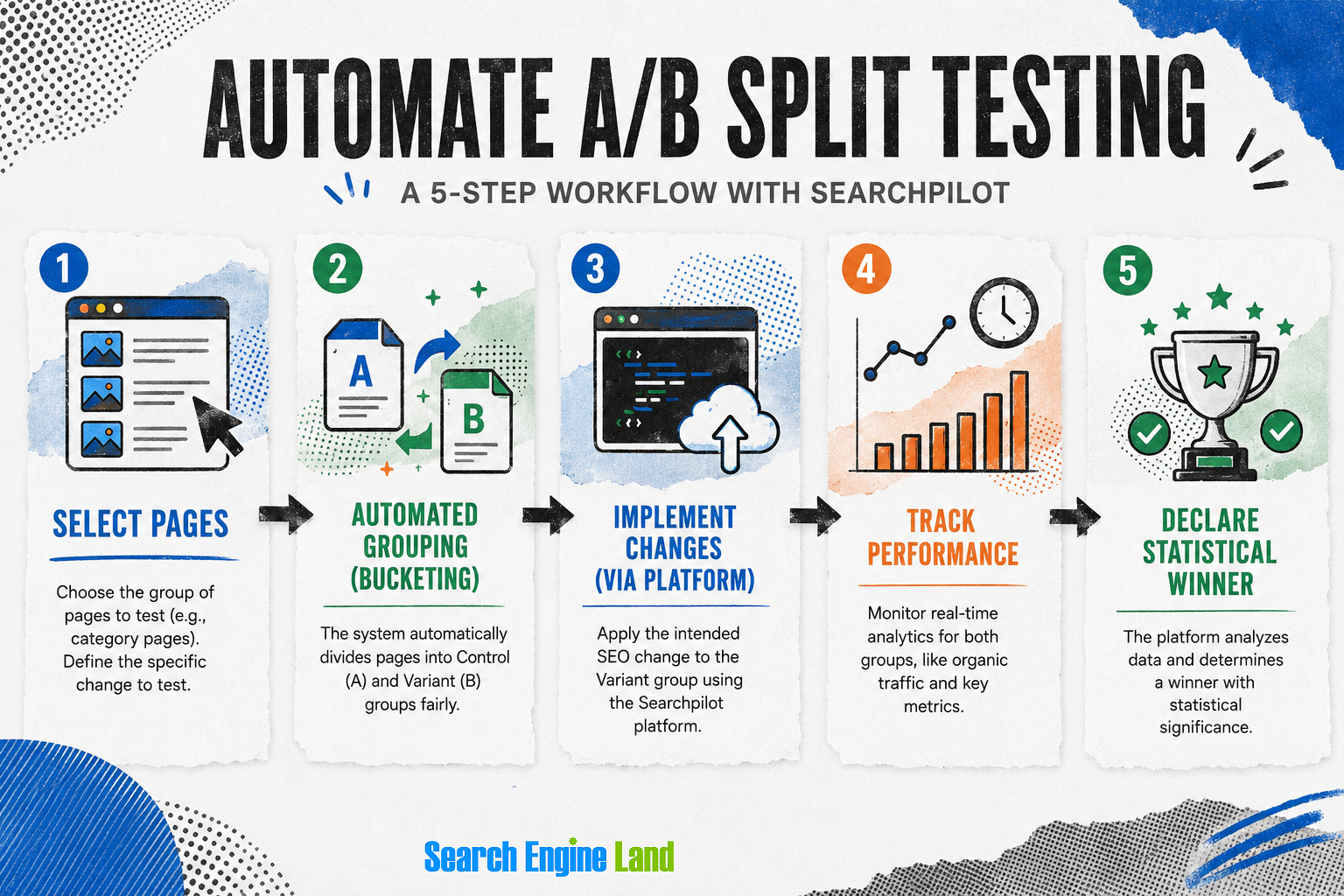
What you may not know is that A/B split testing can be done programmatically. For instance, you can use tools like SearchPilot to launch and monitor SEO split tests without requiring developer support.
These tools are simple to use and sit on your CDN between your server and the users (or Googlebot). This means you likely don’t need developer support, because you are not changing the actual website, only what users receive. You choose which pages and which tests you want to use, then the tool does the splitting for you. You can then check the performance of the control and variant versions to see which one comes out on top.
It is technically possible to recreate a similar system using Cloudflare, which has similar features, but it would require a lot of tweaking. It could perhaps be a good challenge.
Competitor analysis and monitoring automation
We previously touched upon competitor analysis (entity tracking), however, since competitors are always on the move, it’s worth keeping a close eye on any sudden changes.
You can, for example, detect when competitors publish new articles by monitoring their XML sitemap using nothing but Google Sheets and some JavaScript. Then set yourself up to automatically receive a weekly or monthly email report. Go even one step beyond this and connect Semrush Trends API to enrich the data further.
Alternatively, you could also automate rank tracking for competitors via the Semrush API and set up alerts to go after similar keywords.
Automating aspects of prospecting and qualifying leads
Finding leads can sometimes be pretty frustrating, but you can use automation to improve your success rate.
For instance, to expose SEO issues, you can scrape:
- Online reviews: Unanswered online reviews leave a gap that customers fill with their own assumptions. Finding relevant questions that are missing useful answers or providing a suitable response to a complaint is a great way for a brand to reclaim and control the narrative. You can use this to your advantage and expose this issue to the company to try and convince them into hiring your services.
- Indexed staging sites: Having an indexed staging site looks unprofessional and can even be a serious SEO liability. By flagging this to a company you are providing useful information to them and it might help you get them as a client.
- Missing links from Google Business Profiles: Knowing that a client is missing links from their Google Business Profile can be a great angle to approach them with and use as an ice breaker which hopefully leads to a closed lead.
You can achieve this by using specialized APIs that contain this information and then analyze it programmatically to get the desired output.
You can also automate qualifying leads and booking appointments.
- For example, if a user fills in a contact form on your site, you can then send them an automated form with some questions.
- From there you can filter and classify the lead. If they meet your minimum requirements, you can then send them a link to book a free consultation.
These automations have been around for a while inside different CRM tools. However, you can build your own and customize it to your exact needs. You just need a form builder, a scheduling tool, and a way for them to talk to each other.
Tools like Zapier or Make.com are excellent for these use cases. Once you’ve configured the logical rules then you just embed the form on your website and watch the leads flow in.

Monitoring and reporting automations
Monitoring and reporting is one of the tasks where automation is indispensable and opens up many different opportunities.
For instance, you can set up automated anomaly alerts for drastic changes in:
- Traffic
- Rankings
- CTR
- Conversions
Understanding these shifts quickly can help you accurately interpret SEO data. You can get these alerts in a weekly email report but you can also link it directly to your Slack or other messaging app via a webhook so you are always on top of everything.
Here’s how you could approach this:
- Retrieve your Semrush API key (paid subscription only)
- Consider the rate limit for your subscription
- Familiarize yourself with the different endpoints you will be using (like /domain_rank)
- Ask AI to help you create a Python dev environment with requests, panda and matplotlib libraries
- Then ask AI again to write a script that will connect to the API, pull the metrics you chose and load them into a Panda DataFrame
- Do some test runs and debug as needed
- Once you are satisfied with the result you can schedule it to run on a recurring basis
- Feed the gathered data into SEO dashboards built in a data visualization tool like Tableau or Power BI
- Review the data and refine it over time to only get the data you really need
There is a comprehensive tutorial on this exact process that you can find in this SEO reporting guide.
Automated “content decay” detection
Instead of waiting for organic traffic drops, you can pull data from your rank tracker over time via API and try and predict the next big drop. Detect keywords slipping from positions 3–10 → 10–20 (for example), and flag associated URLs automatically so you can act quickly and get them back on track.
Automated cannibalization detection and resolution routing
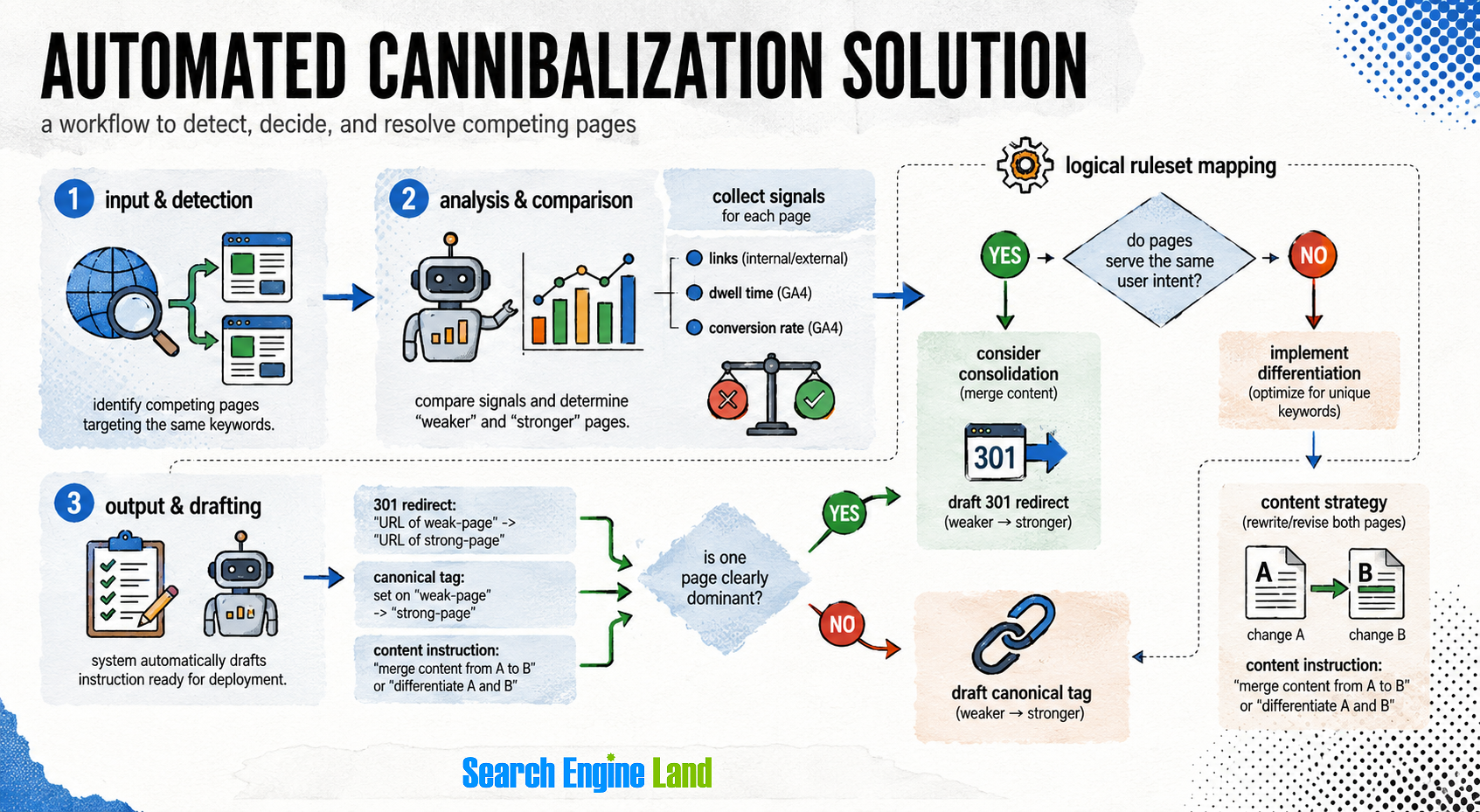
Resolving cannibalization issues boils down to following a predetermined logical path. The page with the weaker signals (links, dwell time, conversion rate from Google Analytics 4) is most often simply redirected to the one with stronger signals. Other times the content should either be consolidated or differentiated.
This logical ruleset lends itself perfectly for automation. Create a system that detects cannibalization issues, and then map out these rules so the system even drafts the canonical tag or 301 redirect instruction ready for deployment.
First, you want to identify the competing pages by looking at their Google Search Console (GSC) data, which could be extracted via the GSC API. Then, enrich this data using additional tools like Semrush or Ahrefs to help determine their strength (for instance Authority Score or URL Rating) or GA4 to check their conversion rates or time spent, scroll depth, etc. Create a database using this data, which can just be a simple Google Sheet.
From there, create rule based logic. First determine if the pages serve the same user intent. If they do, you might as well merge and redirect the URL you identified as weaker to the stronger one.
However, if the user intent is not the same then you need to choose if you want to differentiate the content, merge it or canonicalize one URL to the other. This can become quite complex, but think of it like this:
- If pages provide a distinct value but were poorly optimized, then differentiate the content
- If the pages need to exist for functionality or UX reason, then canonicalize
That should cover all cases, just remember to always prioritize the page with the stronger signals.
SEO automation case studies
Real-world examples demonstrate the power of deploying these workflows efficiently.
Automation allows a 10x growth in productivity
ECO & Tech partnered with a fast-growing SEO agency to fully automate their delivery pipeline. They integrated Ahrefs, Semrush, and Surfer SEO to automatically generate keyword clusters. The system used OpenAI to draft initial content, which was then automatically pushed to a CMS using N8N after human review.
Because the system handled the heavy lifting, the agency successfully scaled its workflow and processed more sites per day without hiring additional SEO staff. They boasted an astonishing 10x productivity boost where a single SEO specialist could now manage 10+ websites daily instead of one to two.
The agency was able to grow and get more clients all while keeping the same headcount. Beyond this, the study also documents the added benefit that this automation ensured a more reliable process and the ability for experts to focus on other aspects while the system they built did all the heavy lifting.
Increasing content production and engagement
Another interesting example is this AI media automation for marketing teams case study. In this study, Khalil Alsalim generated different media content like videos, audio and music assets for different corporate events as well as launches of hotel venues. Some SEO elements — like flagging thin or duplicate content, missing metadata and interlinking gaps — were automated, and QA bots that tested rate rules, blackout dates and localization requirements were introduced.
According to this case study, the marketing teams saved 12+ hours weekly across multiple departments and managed to produce the content faster than usual all while achieving a higher engagement.
Moving forward with SEO automations
Are you ready to take the next step in your workflow and leverage the power of automation for your benefit? Automation is very powerful and it’s an indispensable asset when used correctly.
However, it’s easy to make mistakes and these can have dire repercussions. Always think of the worst-case scenarios that could happen and involve a human to ensure things don’t get out of hand. This includes scheduling regular checks to see if everything still works as it should.
Before you automate anything, use the decision tree in this guide on AI agents vs. traditional automation to decide whether AI is safe to use for a given task. From there, choose which automation method fits the SEO tasks you want to offload, rule-based, AI, or a mix, and start putting it to work today.
Explore more on
Editorial disclosure
Search Engine Land is owned by Semrush. We remain committed to providing high-quality coverage of marketing topics. Unless otherwise noted, this page’s content was written by either an employee or a paid contractor of Semrush Inc.
About the author